You record. AI runs the workflow.
That is the goal of a one-person AI video production studio: a system that prepares the script, processes the recording, creates the delivery assets, and publishes the finished content. The creator’s recurring manual task is recording.
Reaching that goal takes more than an editing prompt. The agent needs production knowledge, executable tools, durable job state, quality checks, and an authorized publishing connection.
KOS can hold the production context. Kraven Video Studio can provide the media-production tools. A custom controller connects the stages and manages each production job.
This is a proposed recording-only workflow. Current Studio requires human editorial approval and does not publish to platforms. Unattended operation needs additional orchestration, automated editorial assessment, an explicitly supported autonomous release mode, and a publishing adapter. Those capabilities are implementation requirements, not features unlocked by this article or its example prompt.
The recording-only production workflow
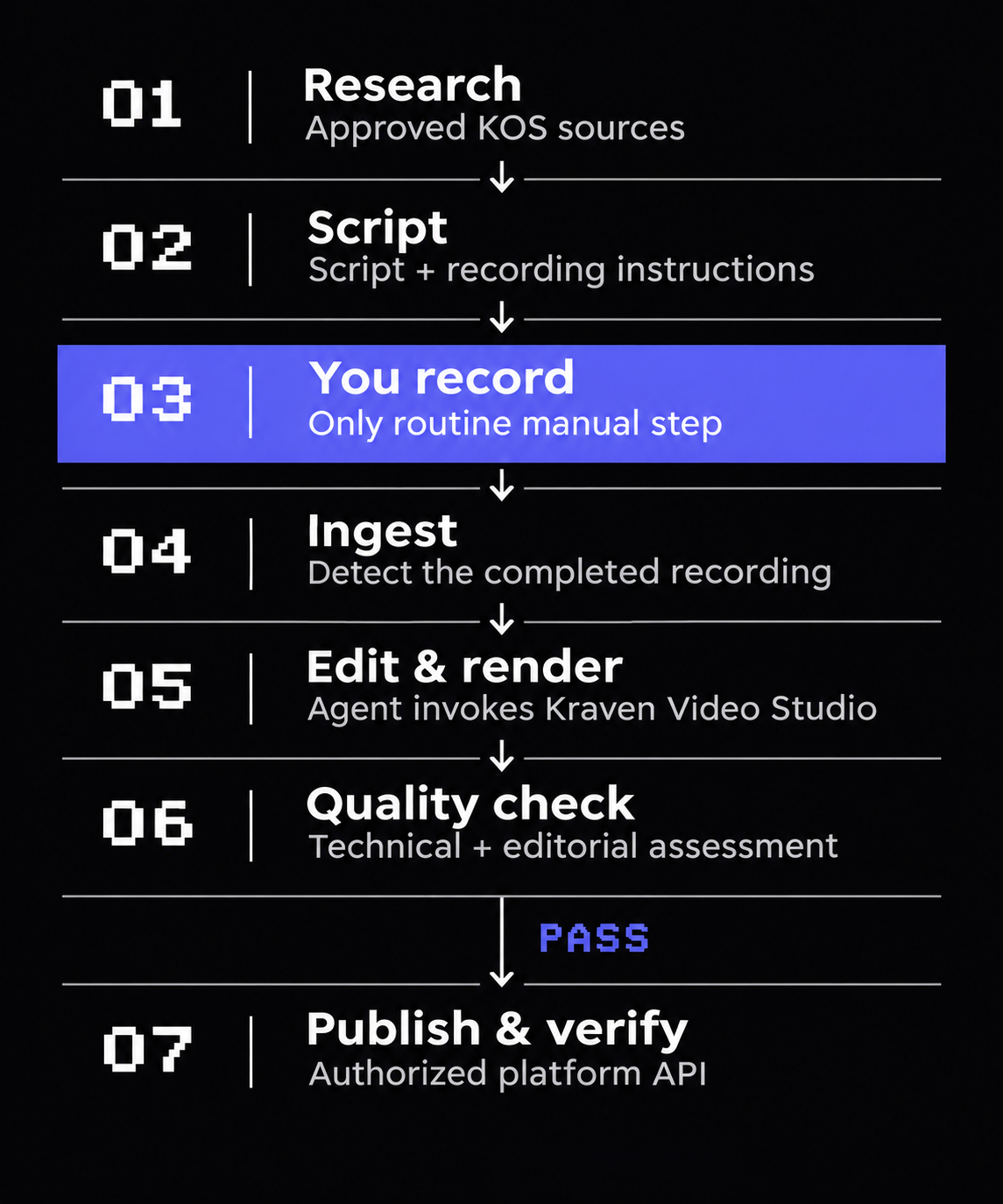
Target workflow after setup and implementation. Select the image to view it at full size. Failed or uncertain quality checks must stop or revise the job before publication.
Define one repeatable production before building the agent
Start with one audience, one video format, and one publishing destination. For example:
Produce a weekly software tutorial using approved product documentation. Prepare one landscape tutorial, three portrait clips, subtitles, a thumbnail, covers, and publication copy.
Define the permitted topics, source references, visual style, deliverables, processing budget, retry limits, and publishing authority once. Account authorization and system commissioning also happen during setup. The recording-only objective applies to the normal production cycle after that work is complete.
KOS should maintain the brand and audience guidance, approved terminology, production policy, durable decisions, and current handoff. Keep scripts, transcripts, and render reports with their individual jobs instead of accumulating every intermediate output in project memory.
Use one controller with clearly separated roles
A single orchestration agent can perform the producer, writer, editor, designer, reviewer, and publisher roles in sequence. Seven workflow stages do not require seven independently running agents.
The controller decides which stage can run next. Named tool adapters perform the work with validated inputs, and a durable job record stores what happened. Model-generated plans should not bypass the controller’s permissions or release conditions.
| Component | Responsibility and current boundary |
|---|---|
| KOS | Maintains the context that the team or agent deliberately supplies to each task. It is not the scheduler or rendering engine. |
| Kraven Video Studio | Provides documented transcription, editing, captions, graphics, rendering, and validation workflows with human review gates. |
| Controller and triggers | Additional implementation that starts jobs, invokes tools, saves state, and manages retries. |
| Automated editorial assessment and release | Additional implementation needed for an explicitly supported unattended release policy. It must not fabricate human approval. |
| Publishing adapter | Additional integration that uploads to an authorized destination and verifies the resulting platform state. |
01 — Research from approved KOS sources
A configured trigger starts the job. The controller retrieves the production policy and only the context relevant to the selected topic.
The research role selects a topic from the permitted backlog, reads its references, and prepares a brief with an audience, outcome, factual basis, and planned deliverables. It should retain the supporting sources with the job so later stages can check claims against them.
For a product tutorial, approved documentation and release notes are a useful starting boundary. Missing evidence should become an unresolved finding, rather than an invented feature claim.
This trigger is a separate orchestration component. Maintaining KOS files does not automatically schedule work or connect them to Studio.
02 — Prepare the script and recording instructions
The writing role turns the brief into a recording package: the opening hook, spoken script, demonstration sequence, pronunciation guidance, and material that must remain visible on screen.
For content that will also become portrait clips, the plan identifies self-contained explanations that can survive a shorter edit. A prerequisite or plan restriction belongs with the explanation it qualifies.
The controller makes this package available in the configured recording workflow. The creator should not need to manually assemble the script, reference notes, and shot list for every production.
03 — You record
The creator records the presentation and demonstrations using the prepared instructions.
Configure the recording application to save into the production intake location automatically. Requiring the creator to rename, move, and organize every recording would add manual work to the target workflow.
Preserve the original footage. The recording becomes the reference for what was actually said; the script remains the reference for what was intended. The agent must investigate meaningful differences between them.
04 — Ingest the completed recording
A new file appearing in a folder is insufficient: the recording application may still be writing it. The intake adapter needs a reliable completion signal or an appropriate file-stability check before processing starts.
Once ready, it associates the recording with its job, records its fingerprint, and preserves the source. The controller then advances the job to post-production.
Use persistent state so restarting a session does not create a second job for the same recording or repeat a completed stage without a reason.
05 — Edit and render through Studio
The editing role prepares the edit specification and invokes supported Studio tools. The documented production workflow includes transcription, reviewed takes and cuts, portrait and landscape profiles, captions, generated B-roll cards, deliberate zoom and sound cues, covers, thumbnails, and package validation.
In the target architecture, the agent selects candidate ranges and enhancement cues according to the production policy. It then assesses the resulting output and revises decisions when required. Technical rendering alone does not establish that those editorial decisions were correct.
Portrait framing deserves particular attention. Keeping the presenter’s face visible is insufficient if the crop hides the interface being demonstrated. Likewise, a repetition or pause can carry meaning and should not be removed merely because it resembles a mistake.
Current Studio’s human review requirements still apply. The custom controller must stop at those gates until an explicitly supported autonomous review and release contract has been implemented and validated.
06 — Assess the actual deliverables
Separate deterministic validation from editorial assessment.
Deterministic checks can establish whether the video decodes, required files exist, dimensions and durations match the profile, captions fit the timing bounds, and audio meets the configured delivery requirements.
Editorial assessment must examine meaning, factual support, framing, pacing, readability, and whether titles and artwork describe the finished content accurately. Its inputs need to include the rendered picture and audio, transcript, edit decisions, and source references. An editing summary alone is insufficient.
An automated reviewer must be able to return unable to establish quality. Its assessment is not a guarantee of accuracy. Run it as a distinct checking stage with explicit evidence requirements, rather than accepting the editor’s assertion that its own work is correct.
A recording-only implementation needs truthful machine-review records identifying the policy, assessed files, findings, and permitted release action. A machine assessment must never be recorded as a human approval.
If required checks fail, attempt a bounded correction and reassess the new output. If they still cannot pass, hold the job. Changed files invalidate the earlier assessment; the publisher must receive the exact versions that passed the supported release policy.
07 — Publish through an authorized adapter
Preparing an upload package and publishing it are different operations. The publisher needs an explicitly authorized destination, visibility settings, and a record of what has already been uploaded.
For a YouTube-first implementation, the official Data API provides video upload and metadata operations. Its resumable upload protocol supports recovery from interrupted transfers. These are capabilities for a custom adapter, not built-in Studio publishing features.
Set visibility explicitly, upload the assessed deliverables and configured metadata, check processing and publication state, and save the platform video ID, resulting URL, and status.
If a request times out, reconcile its outcome before starting another upload. An uncertain response must not quietly become duplicate public content. An upload receipt also must not be reported as verified publication before the required platform checks complete.
Keep the job resumable
A simple proposed lifecycle is:
Planned → Script ready → Awaiting recording
                              ↓
                         Recording ready
                              ↓
                    Editing → Quality checks
                                  ↓
                       Passed → Publishing → Published

                       Failed → Correction or hold
Retain the current stage, input and output fingerprints, retry count, quality evidence, and publishing receipts. A closed assistant session should not erase the knowledge that a video has already been rendered or uploaded.
Store credentials in the appropriate protected secret store, outside KOS notes, scripts, and delivery packages. Supply each role only the information and tool access its task requires.
A practical one-person production
Imagine a creator publishing a weekly six-minute software tutorial. The configured trigger selects a supported topic, prepares its script and demonstration instructions, and waits for the recording.
The creator records the tutorial.
The target agent workflow then ingests the completed file, reconciles the transcript, prepares the landscape edit and three portrait selections, creates captions and artwork, assesses the rendered deliverables, and publishes through the authorized adapter when every required gate passes.
It records the results and useful production lessons in KOS. On that successful production run, recording is the creator’s only recurring manual task.
Failed recordings, unavailable services, or broken authorization remain exceptions that can stop the job. Preserve the failure clearly instead of publishing an uncertain result to maintain the appearance of automation.
Give the agent a concrete starting instruction
Operate a recurring video-production workflow using the specified KOS context and supported Kraven Video Studio tools.
Prepare the brief, sourced script, and recording instructions. After the recording application completes its output, preserve the source and continue the durable production job.
Assess the actual rendered picture, audio, captions, artwork, and metadata. Use bounded retries and stop when required evidence is missing.
Publish only through the explicitly authorized adapter and supported release policy. Never invent human approval or report an upload as published without verification.
If a required unattended capability is unavailable, mark that dependency as blocked.
This instruction defines responsibility. It does not install the controller, quality assessor, release mode, or publishing connection.
Start with one repeatable format and prove the complete path before adding channels or more agent processes. Use the KOS Starter Kit to organize production context, explore Kraven Video Studio for the media workflow, and use the production-team example as a reference for the responsibilities the controller must coordinate.