A production team can record a useful video in an afternoon and spend the following days resolving everything around it: which take to use, how a feature name should appear, which feedback is current, and whether the final export includes the approved changes.
AI assistance can help execute the edit. It works better when the team also gives it a clear brief, reliable references, and an explicit next action.
That is where KOS and Kraven Video Studio can work together. Studio provides an AI-assisted video production workflow. KOS gives the people and assistants around that workflow a place to maintain context, decisions, and handoffs.
Meet Kraven Video Studio
You shoot. AI edits. You approve.
Kraven Video Studio is a local Windows x64 video production toolkit operated with an AI assistant through Claude Code. It focuses on turning talking-head recordings, lessons, and tutorials into reviewed videos and supporting delivery assets.
Its documented workflow includes:
- Local transcription, followed by transcript and synchronization review.
- Reviewed take selection and cuts, with explicit editorial decisions.
- Portrait 1080 × 1920 and landscape 1920 × 1080 output.
- Burned-in portrait captions and clean-picture landscape delivery, with SRT subtitles for both formats.
- Generated B-roll cards, technical callouts, speaker zooms, and sound cues with deliberately selected timing.
- Portrait covers, landscape thumbnails, and package validation before reviewed delivery.
Operators need their own Claude access. Setup, hosted AI usage, and third-party licensing have their own requirements; current installation details are linked from the Studio product page.
Human review runs throughout production. Someone still needs to verify the words, listen to the cuts, inspect the framing, and approve the actual deliverables.
How KOS makes AI assistance more useful
An instruction such as “edit this recording into a tutorial” leaves important decisions unresolved. Who is the viewer? Which claims are approved? What terminology must remain exact? What should happen when the recording contradicts the script?
A team can maintain those answers in KOS and supply the relevant material to its editing assistant.
| Context maintained by the team | What it helps the assistant and reviewers do |
|---|---|
| Audience, objective, and deliverables | Keep the edit focused on the intended viewer and outcome. |
| Approved script, terminology, and claims | Check names, acronyms, prerequisites, and qualifications against a reference. |
| Creative guidance | Apply consistent caption, artwork, callout, and sound choices. |
| Current state and review feedback | Resume from the right version and identify unresolved decisions. |
| Lessons from previous productions | Reuse useful corrections and avoid recurring mistakes. |
Studio works independently of KOS. This is a proposed way to organize the surrounding production work, rather than a built-in automatic integration. The team or assistant must deliberately load the relevant context and maintain the records.
Keep that context small. An editor preparing one clip needs the brief, relevant terminology, selected footage notes, and current review instructions. Loading the entire production archive adds noise and can expose material the task does not require.
A full production-team example
Imagine a SaaS company preparing a feature-launch campaign from a 20-minute product walkthrough with a presenter and screen demonstration.
The planned outputs are one edited landscape tutorial, three portrait clips, subtitles for every finished video, a tutorial thumbnail, portrait covers, and supporting publication copy.
This is an illustrative production plan, not a measured customer result or an automatic one-click workflow.
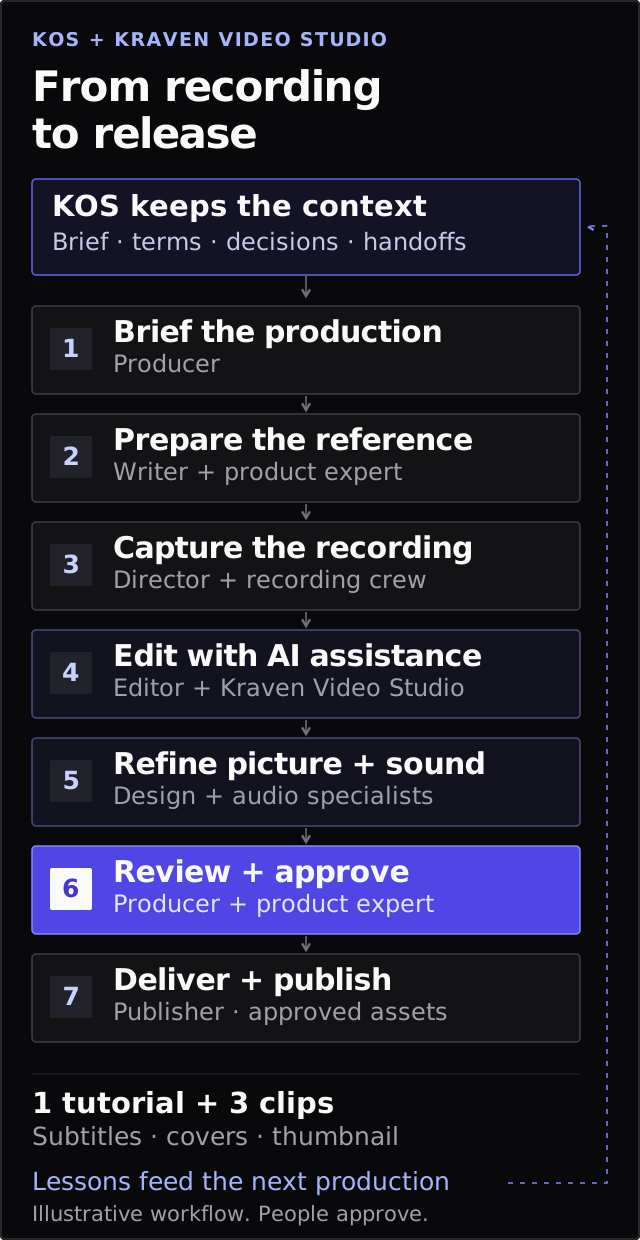
KOS maintains the context around production. People approve the final package before publishing. Select the diagram to view it at full size.
1. The producer establishes the brief
The producer records the audience, campaign objective, deliverables, owners, and review deadlines in KOS. The brief identifies content that must survive the edit, including plan restrictions and prerequisites.
For example, if the recording says a feature is available only on selected plans, shortening the clip must preserve that qualification.
2. The writer and product expert prepare the reference
The writer maintains the outline and messaging. The product expert confirms feature names, interface labels, and factual claims.
They give the editing assistant a compact instruction: use the approved names exactly, preserve limitations, and flag differences between the recording and reference for review.
Factual approval remains with the people responsible for the product.
3. The director and recording crew capture usable material
The director, presenter, camera operator, and sound operator work from the same brief and shot plan. Recording notes identify retakes, audio problems, and moments worth reviewing.
They also consider the intended formats. A screen demonstration that reads well in landscape may need a different composition for portrait clips. Raw footage remains preserved.
4. The editor works with Studio and the assistant
The editor uses Studio with the assistant to transcribe the footage, prepare candidate selections, assemble previews, and produce captions.
The editor reviews proposed cuts against the complete recording. A repetition may be a mistake, but it may also carry emphasis. A pause may be unnecessary, or it may give the viewer time to understand a demonstration.
Portrait adaptations receive framing review for each selected shot. Keeping the presenter’s face visible is insufficient if the crop hides the interface being explained.
5. Design and audio specialists refine the edit
The motion designer identifies moments where a generated B-roll card or callout would clarify the explanation. The audio specialist reviews speech clarity, sound cues, and the complete mix.
KOS holds the agreed creative guidance. Studio provides the production mechanisms. Cue placement remains deliberate: every visual and sound should help the viewer follow the content.
6. Reviewers resolve feedback against a specific version
The product expert checks accuracy, the producer checks the brief, and the editor checks captions, framing, pacing, and cut boundaries.
Useful feedback names a concrete change:
In portrait clip two, retain the sentence explaining the plan restriction. Revise the callout to match the approved feature name.
The handoff records which preview received that feedback, what changed, and what remains unresolved. A changed cut requires renewed timing and synchronization review. Earlier approval does not automatically apply to a revised export.
7. The publisher receives the reviewed package
After human approval and package validation, the publisher receives the videos, subtitles, artwork, and supporting copy. Uploading, scheduling, and platform checks remain separate responsibilities; Studio’s delivery preparation does not publish to social platforms.
After launch, the team records useful lessons in KOS: recurring caption corrections, framing problems, confusing explanations, and audience questions for the next production.
Give the assistant a bounded production task
Once the references are ready, a practical instruction could be:
Using the approved production brief and terminology reference, prepare an edit proposal for one landscape tutorial and three portrait clips. Preserve qualifications and prerequisites. Flag uncertain transcript passages, take choices, and framing decisions. Suggest callouts only where they clarify the explanation. Produce previews for review and list unresolved decisions before final delivery.
That gives the assistant an outcome, constraints, and a review boundary. The producer still owns scope, specialists still own their craft, and named reviewers still approve delivery.
Teams should also decide which materials may be shared with a hosted assistant. Local transcription and rendering do not make every surrounding AI interaction local. Include only the information authorized for the task.
Start with one repeatable production
Choose one recurring format: a weekly tutorial, training lesson, product update, or expert explanation. Define its brief, terminology, creative guidance, review owners, and delivery checklist.
Use Studio to execute the production workflow and KOS to preserve what the team needs to continue it. Measure the result through review time, correction cycles, missed requirements, and the effort required to resume the next session.
Start with the KOS Starter Kit to organize one production project, and explore Kraven Video Studio for the editing workflow. If your team needs help shaping that process, describe the production challenge to KRAVEN.